
Research-based guide. This article compares product approaches using public documentation and general workflow-design principles. It is not a hands-on benchmark, and no execution times, cost savings, or reliability percentages are claimed.
Start with Zapier for straightforward app-to-app workflows, Make for visual branching and data transformations, or n8n when deployment control and technical customization matter. Compare how each platform bills for your actual workflow and who will maintain it after launch.
For many teams, the shortlist includes Zapier, Make and n8n. All three help connect systems and automate work, but they emphasize different operating models.
 Zapier
 Make
 n8n
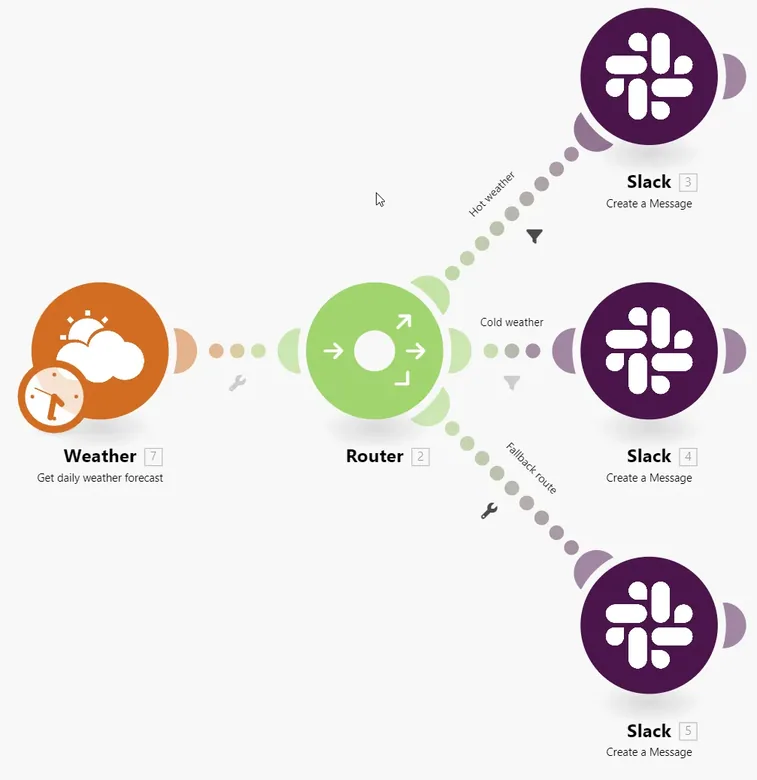
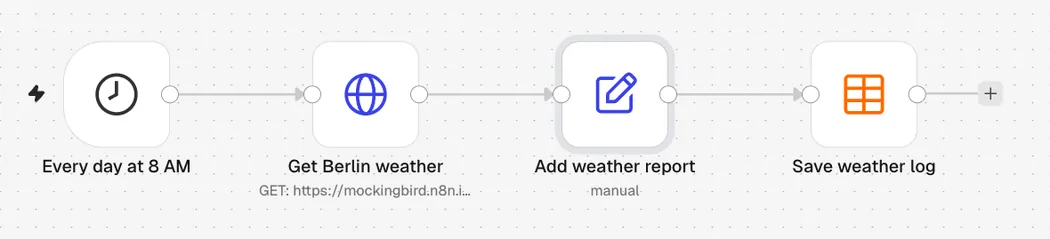
Zapier vs Make vs n8n at a glance
| Primary requirement | Start with | Why |
|---|---|---|
| A nontechnical team wants to connect common SaaS apps quickly | Zapier | Its product experience emphasizes app-based automation and accessible workflow creation |
| You need visual control over multi-step processes and data transformations | Make | Its scenario-oriented builder is designed for branching and multi-step automation |
| You want more control over deployment and technical customization | n8n | It offers both hosted and self-hosted deployment paths |
| You need strict audit, access and data-handling controls | Evaluate all three against your requirements | Governance depends on the actual plan, deployment and configuration |
These are starting points for evaluation, not claims that one platform always wins.
If your workflow needs visual branching, try the same lead intake flow in Make.
The Operator’s Lab may earn a commission if you purchase through this affiliate link.
Try Make1. Map the workflow before comparing prices
Write down the trigger, each system touched, the number of records processed, approval steps and what should happen when a step fails.
For example, a lead intake process might look like this:
- A prospect submits a form.
- The system checks for an existing CRM record.
- A new record is created only when appropriate.
- An owner is assigned.
- A human reviews the outbound message before it is sent.
- Errors are recorded for follow-up.
A workflow with two steps is a different buying decision from one with conditional branches, retries and human approval.
2. Compare the total operating model
Zapier: Evaluate whether your required apps, triggers and actions are available and whether the team can maintain the workflows without a developer. Review the official Zapier documentation and pricing page for current limits.
Make: Evaluate whether visual scenarios help your team understand data transformations, error paths and multi-step logic. Check Make’s documentation and pricing.
For a concrete setup, see the Make lead intake tutorial for webhook retries, deduplication and email alerts.
n8n: Evaluate whether your organization can operate its preferred deployment model, manage credentials and maintain integrations. Self-hosting increases control but also transfers infrastructure responsibilities to your team. Check the n8n documentation and pricing.
Do not compare advertised entry-level prices alone. Verify how the vendor counts executions, operations or tasks for your workflow, and whether the required features are included in your intended plan.
For an example of a workflow that benefits from this evaluation, see the CRM automation and lead-routing checklist.
3. Run the same proof of concept in each candidate
Use a small, realistic process and document the outcome:
| Test | What to record |
|---|---|
| Initial setup | Steps required, account permissions and blockers |
| Duplicate prevention | Whether repeated triggers create duplicate records |
| Failure recovery | Error visibility, retry behavior and manual recovery |
| Change management | How easily another teammate can modify the workflow |
| Security | Credential handling, access roles and data retention |
| Monthly cost | Vendor estimate using your expected real volume |
Avoid assigning numerical scores before running the test. Your requirements should determine the weighting.
If Make is on your shortlist, choose the proof of concept that matches your team’s next step:
- Route leads to the right team and send unmatched submissions to a fallback inbox.
- Send one email per form submission and test webhook retries.
- Prevent duplicate Slack alerts from Make webhooks.
- Match supplier invoices and route exceptions for approval.
- Refresh a weekly cash forecast and flag late receipts.
If your team is also choosing a CRM, see the sales automation software comparison to decide which steps should live inside the CRM.
4. Questions to ask before committing
- Can an employee who did not build the workflow understand its failure state?
- What happens if an API returns an error or a rate limit?
- Who owns the credentials when a staff member leaves?
- Is an approval step required before customer-facing actions?
- Can you export or reconstruct the workflow if you switch platforms?
- What does the projected bill look like at two or five times your current volume?
Recommendation
Choose the platform that your team can reliably maintain, not the one that looks most impressive in a demo.
Start with Zapier for straightforward SaaS-to-SaaS automation, Make for visually complex scenarios, or n8n when deployment control and technical flexibility are major requirements. Then validate that initial hypothesis against one representative workflow before signing up for a paid plan.
Editorial note: Product descriptions are based on public documentation. Check feature availability and pricing with each vendor before purchasing.
 Summaries + tasks
 Attendee → deal
 Meeting note
 650