
Implementation guide. This is a workflow design framework, not a claim that a specific CRM or automation tool was tested. Adapt the controls to your CRM, privacy obligations and team processes.
Start by mapping the path from form submission to follow-up. Define the fields you need, how to match an existing contact, who owns the lead and how the team will recover a failed handoff.
 Make
 Zapier
 n8n
CRM lead routing workflow
- Capture: A lead submits a form, books a meeting or enters through an approved import.
- Validate: Check required fields, consent status and obvious formatting errors.
- Deduplicate: Search for an existing person and company before creating records.
- Route: Assign the lead using a documented territory, account ownership or queue rule.
- Enrich selectively: Add permitted data only when the source and use are appropriate.
- Review: Require human approval for sensitive or personalized outbound messages.
- Notify: Alert the responsible person in the system they actually monitor.
- Log: Store timestamps, source and outcome so a failure can be investigated.
What to automate—and what not to automate
| Process | Automation candidate | Human checkpoint |
|---|---|---|
| Form intake | Field validation and record creation | Review exceptions |
| Duplicate detection | Match likely existing records | Resolve ambiguous matches |
| Lead assignment | Apply agreed routing rules | Resolve ownership disputes |
| Meeting preparation | Assemble account context | Verify important facts |
| Follow-up drafts | Prepare a draft and task | Approve the message before sending |
| Pipeline reporting | Calculate counts and stage movement | Interpret causes and forecast judgment |
Avoid allowing a generative model to invent CRM facts or send unreviewed commitments to customers.
Minimum data fields
Define the fields your team genuinely needs before integrating tools. A common starting point is lead source, company, contact, owner, lifecycle stage, creation date, last activity, consent or communication preference, and a unique record identifier.
Use a stable identifier for updates where possible. Email addresses and company names can change, so they are not always sufficient as permanent keys.
Failure handling is part of the workflow
For each automated step, document:
- What counts as a successful completion.
- Whether a failed request is safe to retry.
- How duplicates are prevented when a trigger fires twice.
- Where an error is logged and who receives the alert.
- How to replay a failed record without sending a second customer message.
A workflow that succeeds only when every API responds perfectly is not production-ready.
For a concrete example, this Make lead intake tutorial shows how to use a submission ID to deduplicate webhook retries before sending the team an email.
Metrics worth tracking
Measure process health, not just activity volume:
- Percentage of valid leads routed successfully.
- Median time from intake to owner assignment.
- Duplicate records created per reporting period.
- Number of failed automations awaiting review.
- Time required to resolve an exception.
- Share of customer-facing messages approved before delivery.
Define the reporting period and data source before publishing any performance claims. Do not infer revenue impact from automation volume alone.
Selecting the tools
Your CRM should remain the system of record for customer and pipeline data. Automation platforms can connect forms, calendars, messaging and enrichment services, but they should not create conflicting versions of the same customer record.
For vendor-specific implementation details, start with the official documentation for your chosen CRM and automation platform:
For a structured comparison of automation platforms, read Zapier vs Make vs n8n.
For a step-by-step example, see how to send inbound lead alerts by email with Make.
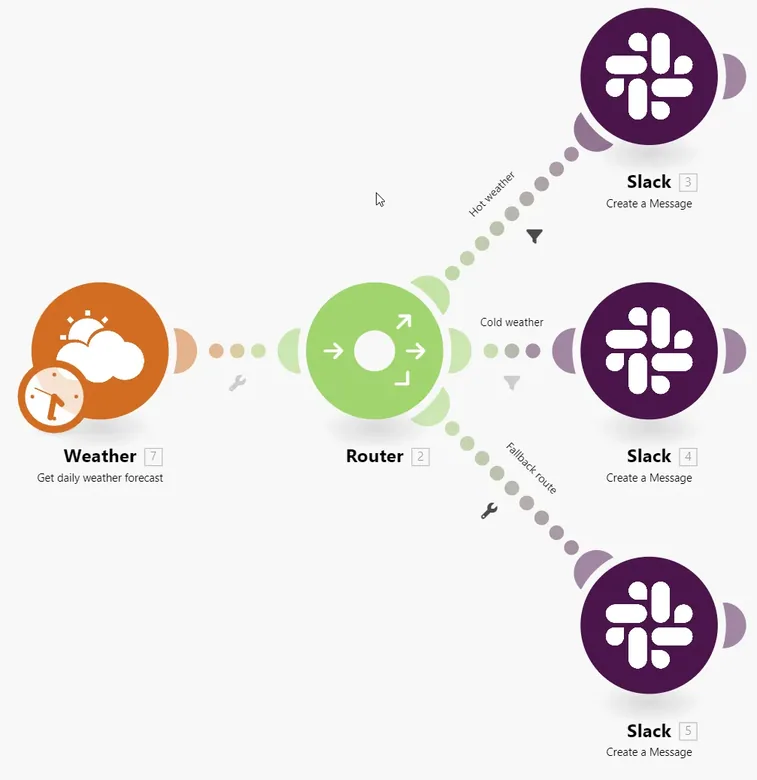
For a concrete routing example, see how to assign form submissions in Make with a Router and fallback.
Launch checklist
Before enabling the workflow for real leads, test one clean record, one duplicate, one incomplete record, one failed API call and one manual override. Confirm that the correct person receives each alert.
Start with a limited volume, review exceptions daily and expand only after the team can reliably explain and recover from failures.
Editorial note: This is a general process guide based on published information.
Affiliate disclosure: The Operator’s Lab may earn a commission from qualifying purchases through the Make link below, at no additional cost to you.
 Summaries + tasks
 Attendee → deal
 Meeting note
 650